Know what's worth picking before you leave the store.
Snap a photo, get real eBay sold comps and a BUY/SKIP call in a snap. No more time-consuming searches in the middle of an aisle.
No credit card required. No app store needed.
Three steps. No learning curve.
How it works
- 1
Snap a photo of the item in the aisle.
Your phone camera is all you need — no barcode, no exact spelling.
- 2
Get real eBay sold comps in a snap.
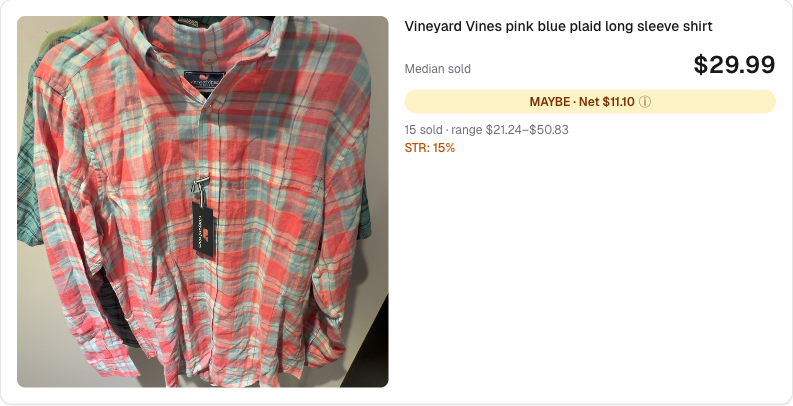
AI identifies the item and pulls recent sold prices while you keep snapping. The median, the range, and the sell-through rate land in your dashboard when you're ready to look.
- 3
Make the call. Log it if you want.
BUY, MAYBE, or SKIP — tuned to your target margin. When you Pick, log what you paid so your dashboard tracks real profit per trip, not just sale value. Tap Leave to move on.
Built around how pickers actually work.
Real comps, not guess-work
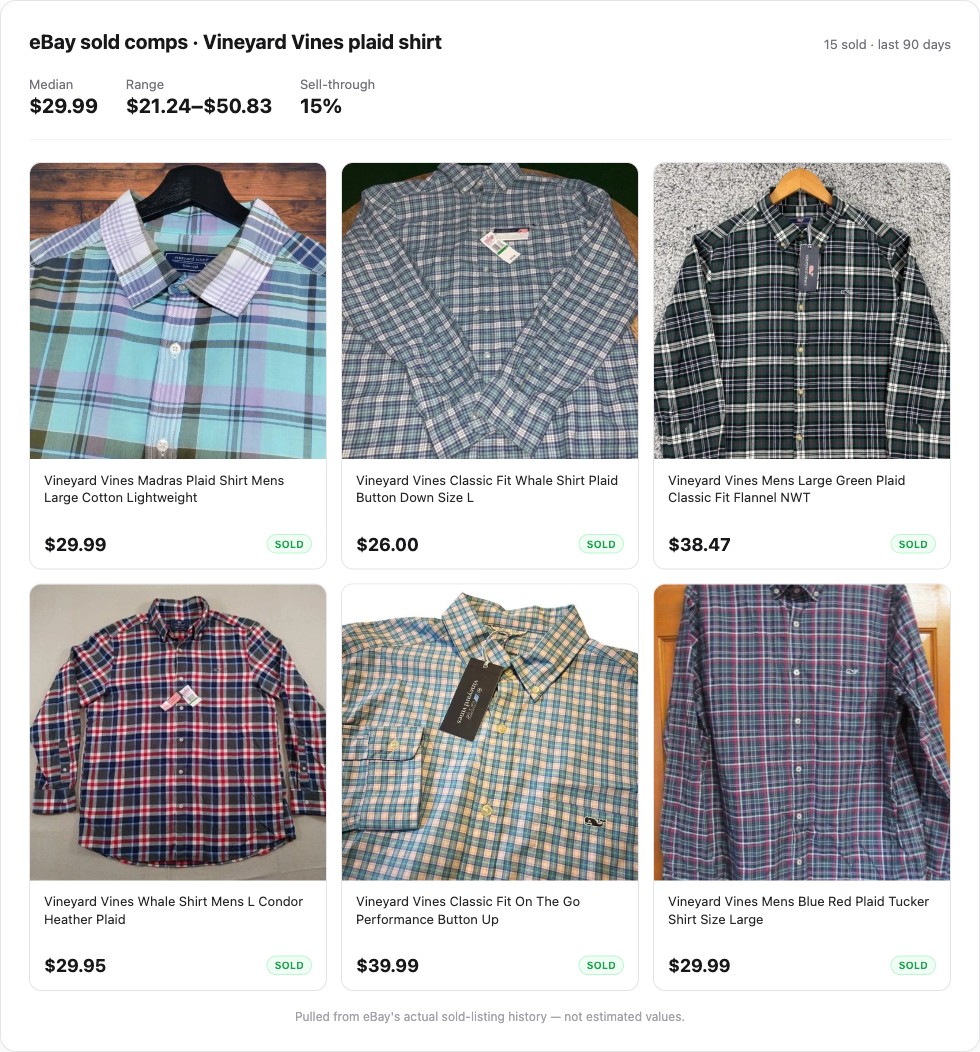
Picker Radar pulls eBay sold listings — not active listings, not estimated values. Median price, sale range, and sell-through rate, so you know what buyers are actually paying.
The BUY/SKIP call does the math for you
Set your target margin once. Every scan comes back with a clear BUY, MAYBE, or SKIP recommendation based on what that item would actually net you — not just what it sells for.
Track your picks. See how you rank.
Every kept item logs to your dashboard, tracked by store. Opt in and your picks count toward public store leaderboards — climb the rankings at your local thrift store, earn badges for hitting milestones, and find sourcing spots other resellers love. Your privacy stays your call.
Real data. Real history. Real numbers.
Every recommendation is backed by actual eBay sold-listings — not estimated values. Every pick logs to your dashboard so you can see which stores have been worth your time.
The data behind every result
See the actual eBay sold listings.
Median, range, and sell-through come from real sold listings. Tap through to see every comp — and easily exclude any that don't match to refine the item's valuation.
What you get over time
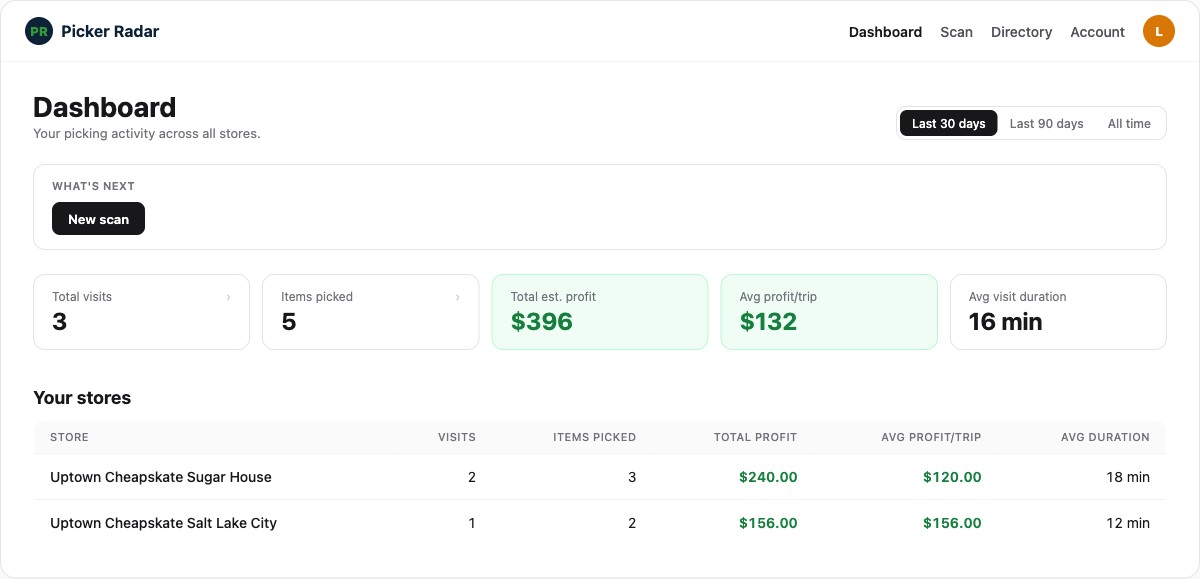
Your sourcing dashboard.
Every visit, every pick, every store ranked by your actual results. The longer you use it, the smarter your sourcing gets.
Try it free. Pay when it's earned it.
Five free lifetime scans, no card required. If you decide it's worth paying for, plans start at $10 a month. The most serious resellers run about 500 to 2,500 scans a month — there's a tier for wherever you are in that range.
Free
$0
lifetime
5 lifetime scans
Starter
$10/mo
or $96/yr
100 scans/cycle
Hobby
$25/mo
or $240/yr
500 scans/cycle
Pro
$40/mo
or $384/yr
2,500 scans/cycle
Annual plans save 20% — billed once per year.
Real questions from real resellers.
- How does scanning an item actually work?
- Three quick photos per item: one of the item itself, one of the brand or care label, and one of the price tag. Picker Radar reads the brand and details from the first two and pulls the cost from the third — so the dashboard can track real profit per trip, not just sale value. The whole capture takes about ten seconds an item, and the comps + Buy/Skip recommendation come back in the background while you keep scanning.
- What if the AI misidentifies my item?
- It happens, especially with unlabeled or heavily worn items. When it does, you can edit the search query before pulling comps, or just move on — it takes less time than opening eBay manually did before. Accuracy improves when the label or brand is visible in the photo.
- What categories does it work for?
- Clothing, shoes, electronics, kitchenware, home goods, collectibles, books — anything that sells on eBay. It is not specialized for any one category. If eBay has sold listings for it, you will get comps.
- How current are the sold comps?
- Comps pull from eBay's recent sold history, typically the last 30 to 90 days depending on how frequently the item sells. You will see the date range on each result so you know what you are working with.
- What happens if I use all my scans?
- On the Free plan, scans are a one-time lifetime pool of 5. On the paid plans they reset each billing cycle. If you approach your cap on Pro, you get a soft warning at 90% but you are never hard-blocked mid-aisle. Starter and Hobby stop when the cycle cap is hit.
- What is the difference between Starter and Pro?
- Volume and priority. Starter gives you 100 scans per cycle at $10/mo. Pro gives you 2,500 at $40/mo, a soft-warn-only cap (so you never get cut off mid-trip), and priority placement in the scan worker queue during high-traffic windows. If you source a few times a week, Starter is usually plenty. If this is your job, Pro pays for itself fast.
- Can I cancel anytime?
- Yes, no questions asked. Cancel from your account page and your access continues until the end of the billing period you already paid for. No prorating, no retention flows.
- Does it work on Android and iPhone?
- Yes. Picker Radar is a mobile web app — it runs in your phone's browser, no download required, and works on Android and iOS. Chrome on Android and Safari on iOS both perform well.
Pick smarter on your next trip.
Five free scans. No card. Takes about 60 seconds to get started.
$0 to start. Upgrade only when you have decided it's worth it.